AI Connector BYOK
Summary
AI Connector BYOK lets you keep using the Odoo AI app with your own provider. Chat, agents, voice dictation, call transcripts, images, embeddings and web search go to the services you choose, with your own keys, instead of Odoo’s paid AI service.Nothing in the Odoo source is edited. The module extends the AI app with inherited models and a runtime patch of its two transport functions. It works with any OpenAI-compatible API, with your own ChatGPT account, and with Cloudflare Workers AI, whisper-api.com, OpenRouter and Voyage AI.
Features
Installation
Configuration
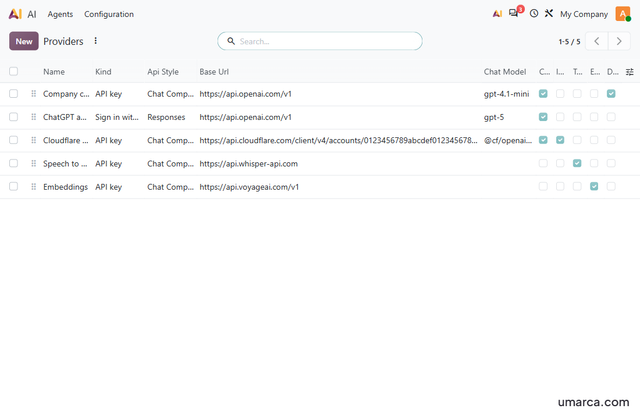
Open AI > Configuration > Providers and click New.The menu is added by this module under the AI configuration menu. Only administrators can see it.
Add a provider
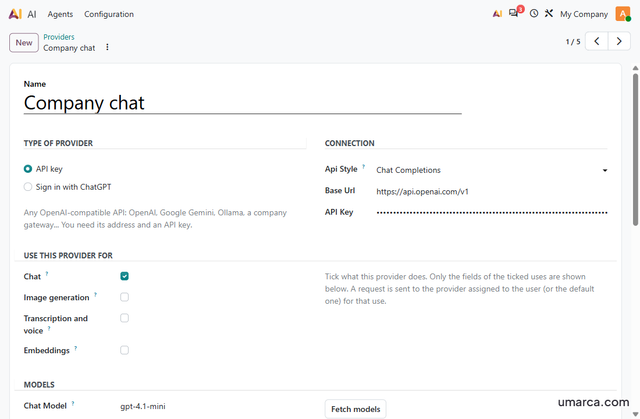
- Name the provider and choose its type: API key, or Sign in with ChatGPT.
- For an API key, enter the Base Url from the provider's documentation (usually ending in
/v1) and the key. - Choose the API style: Chat Completions for almost every provider, Responses for OpenAI.
- Under Use this provider for, tick Chat, Image generation, Transcription and voice, or Embeddings. Only the fields of the ticked uses appear.
- Click Fetch models to pick from a dropdown, or type the model names.Some providers have no model list. Then the fields stay as text boxes and you type the names.
- Under Assigned To, add users or groups, or tick Default Provider.
- To use a provider for one agent only, choose it in the AI Provider field of that agent.
How requests are routed
- Each job (chat, images, transcription) goes to the provider assigned to the user, or to the default provider, that has that use ticked.
- A job without a provider shows a clear message. The other jobs keep working.
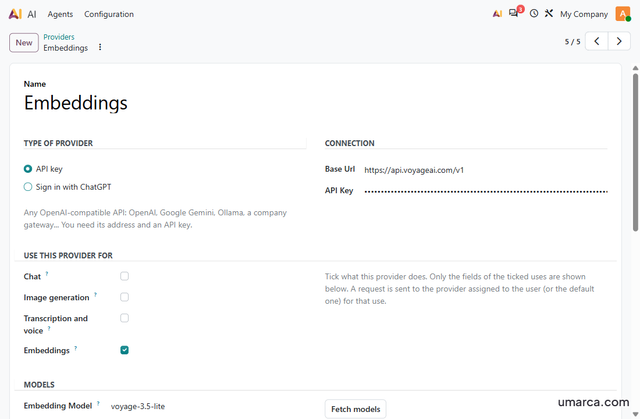
- Embeddings use the one provider that has Embeddings ticked.
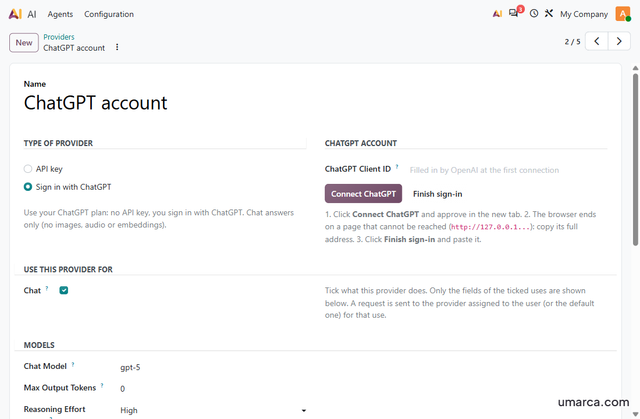
Sign in with ChatGPT
- Click Connect ChatGPT and approve in the new tab.
- Copy the full address of the page you land on. It starts with
http://127.0.0.1. - Paste it into the Finish sign-in box. No API key or client ID is needed.The landing page cannot be reached on a hosted server. That is expected. Pasting the address is what completes the sign-in. Your computer's clock must be correct, or OpenAI's token is rejected as not yet valid.
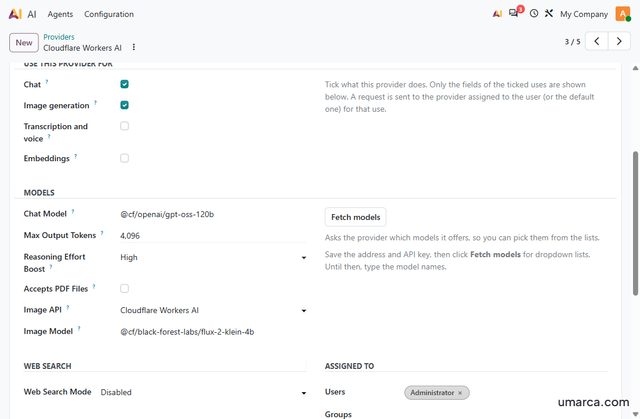
Cloudflare Workers AI
- Base Url:
https://api.cloudflare.com/client/v4/accounts/YOUR_ACCOUNT_ID/ai/v1 - API Key: your Cloudflare API token
- API style: Chat Completions
- Chat model: for example
@cf/openai/gpt-oss-120b - Max Output Tokens:
4096 - Images: tick Image generation, set Image API to Cloudflare Workers AI, and use a model such as
@cf/black-forest-labs/flux-2-klein-4b - Use the full model names.Some models are available only on a paid Cloudflare plan. The provider error notification shows Cloudflare's message when a model is refused.
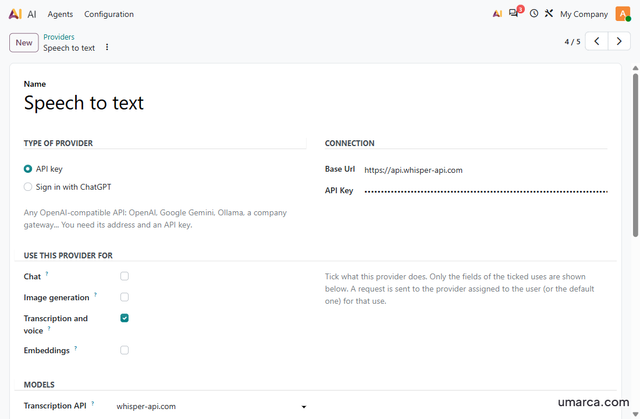
whisper-api.com (speech to text)
- Base Url:
https://api.whisper-api.com - Tick Transcription and voice only
- Transcription API: whisper-api.com
- Model: tiny, base, small, medium or large-v3
- Each clip takes a few seconds, because it is processed in the background.
Embeddings
- Tick Embeddings on one provider and set its embedding model.
- Only one provider can hold Embeddings.
- Leave Send Dimensions off unless the provider is OpenAI and you use a text-embedding-3 model.Most other providers reject the dimensions parameter.
Encryption key (optional)
- Set
umarca_ai_encryption_keyin odoo.conf, as shown in the installation steps. - On the next start the stored provider keys are re-encrypted under it and the old key is removed from the database.
- Back the key up. Without it the saved keys cannot be decrypted and must be entered again.
Technical notes
The module edits no file of Odoo. It extends the AI models with inheritance and, when the server loads it, replaces two functions of the AI app (the connection lookup and the transport call) so requests go to your providers.The patch is installed once in post_load and skipped if it is already in place.
Chat requests that Odoo sends to its agent loop run in a background thread and are delivered to Odoo's own signed webhook. A lease and a one-minute scheduled action resubmit a request that was lost (up to 3 attempts, 60 second margin). The values are system parameters under umarca_ai_gateway.
Resolution order for each job (chat, image, transcription): the provider pinned on the agent, then a provider assigned to the user or one of the user's groups (lowest sequence first), then the default provider. Only providers with that use ticked are considered. Embeddings use the single provider that has Embeddings ticked. Public and website visitors never resolve to a ChatGPT sign-in provider.
Secrets use Fernet encryption. They are never sent to the browser, never logged, and not shown in the record history.
The web scraper runs inside Odoo, checks each address and each redirect against private, loopback, link-local and reserved ranges, and ignores proxy settings.
Known limits: the scraper takes no screenshots. A ChatGPT sign-in does chat only and cannot be the default provider. Odoo's own document search keeps only chunks with a cosine similarity of 0.9 or more, so a question worded very differently from the stored text can return no context with any provider. A few Odoo services outside the AI app, such as the Google Translate proxy, are not rerouted.
Python packages: PyJWT (ChatGPT sign-in) and markdown2 (formatting of AI answers; Odoo's tests expect version 2.5.4).
Changelog
- Providers for chat, images, transcription and embeddings, each resolved separately
- Assignment by user, group, default provider or agent pin
- API-key providers (Chat Completions and Responses) and Sign in with ChatGPT
- Adapters for Cloudflare Workers AI images and whisper-api.com speech to text
- Fetch models, Max Output Tokens, Send Dimensions off by default
- Web search, built-in scraper with network guard, PDF and image input
- Voice dictation and call transcripts with timestamps
- Encrypted provider secrets with an optional key in odoo.conf
- Provider errors shown as a notification