Integration

Enabling Direct POS Printing Without an IoT Box

Production
4-branch restaurant group
Odoo Community and Enterprise

The problem

The client's POS relied on Odoo's IoT Box to connect the system with thermal printers. However, the IoT Box was unreliable in day-to-day use, causing printing failures and interruptions at the point of sale. Since printing was an essential part of the POS workflow, these failures directly affected the reliability of the operation.

The solution

I developed a custom Odoo POS printing module using QZ Tray to communicate directly with local printers. This removed the IoT Box from the printing path while allowing the POS to continue using the existing thermal-printer setup. The module handles print jobs directly from the POS and provides a simpler local printing architecture.

What was delivered

Direct Odoo POS printing through QZ Tray, removing the IoT Box dependency
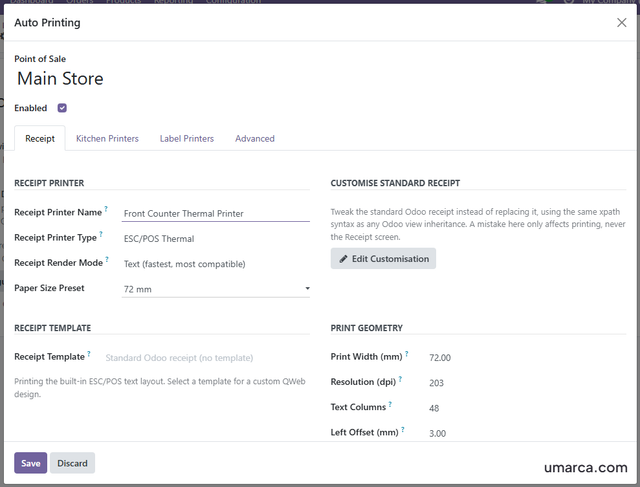
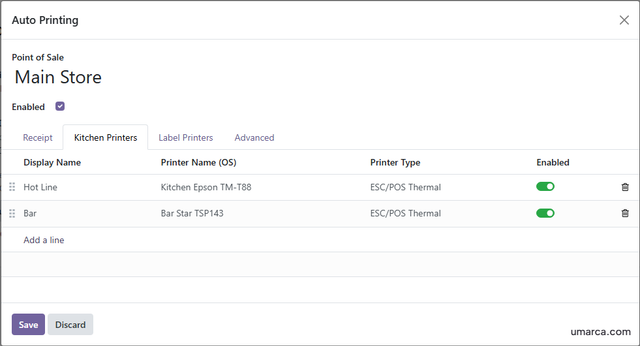
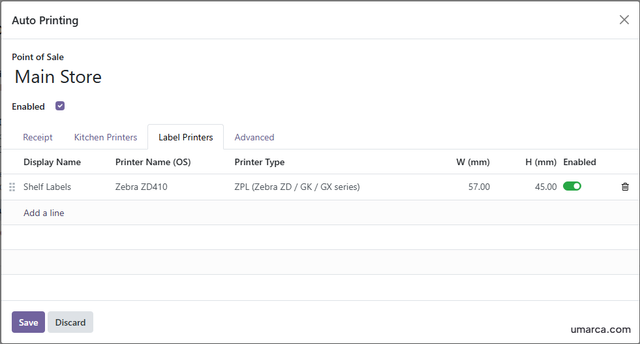
Receipt, kitchen ticket and label printing from the POS
Category-based routing for multiple kitchen printers
Support for ESC/POS, PDF, ZPL and EPL printer languages
Custom QWeb templates for receipts, tickets and labels
Offline template rendering and automatic QZ Tray connection
Optional signed printer certificates for controlled browser-to-printer communication

The result

Reduced hardware dependency: POS printing can operate without an Odoo IoT Box
Simpler deployment: Printers can be configured directly from the POS environment
Faster printing workflow: Receipts, kitchen tickets, and labels are sent directly to the configured printers
Flexible printer routing: Different printers can handle different document types and product categories
Offline capability: Printing continues to work when the POS temporarily loses internet connectivity
Cross-platform support: Works across Windows, macOS, and Linux environments
Broader printer compatibility: Supports common ESC/POS, EPL, ZPL, and PDF printing workflows
Operational continuity: Automatic connection handling and fallback mechanisms help keep POS printing available during normal connection issues

A simpler and more reliable POS printing setup that connects Odoo directly to local printers through QZ Tray, reducing reliance on an IoT Box while supporting receipts, kitchen tickets, and product labels across different operating systems.

Available on Odoo Store
Click to visit Odoo App Store Listing

My role

Developer and QA

Odoo modules

pos_auto_print

Integrations

QZ Tray

Stack

Python
JavaScript
HTML

Gallery

Receipt Printer Settings
Kitchen Printer Settings
Label Printer Settings

Have a problem like this one?

Tell me what is breaking. I will say honestly whether Odoo is the right answer.